iOS 27 is finally out, and after a confusing upgrade process (my phone told me it was installing iOS 26.7 after I’d asked it to install iOS 27, even though it did actually install iOS 27), I’ve had a chance to play with the new Siri AI.
I know it’s been available for a few months as part of the iOS beta, but I’m not one to try betas on my main device. My test device is an iPhone 12 mini from 2020, which doesn’t support Apple Intelligence whereas my main device, an iPhone 16 Pro Max does.
It’s a significant upgrade. Apple has finally binned the old intent-based Siri and started over with a modern agentic system that uses LLMs. Over the past year or so, with the exception of Siri, I’ve only found myself having to use an old intent-based chatbot a handful of times - and boy have they aged badly! I say that as someone who used to spend a lot of time building and testing the things. It was clear to me as far back as 2022 that these intent-based chatbots were eventually going to be replaced by LLMs. ‘Agentic’ wasn’t really a thing yet, although if you take the core concept of an agent, a loop that runs until the LLM determines that the request has been fulfilled, then this was certainly something that existed in rudimentary form even back then. It’s surprising therefore that it took Apple this long to ditch the old Siri.
On iOS (and iPadOS - they are the same OS really), the new Siri AI is very impressive.
Take this example: A friend sent me a name, phone number and email address of a guy who fitted their air conditioning over WhatsApp. I wanted to email him for a quote, but it was 8pm on a Friday and I was having dinner. I asked Siri to extract the details on screen and remind me to send the email on tomorrow. It did so perfectly.
Another example: my local council has decided to change the days our bins are collected - recycling, food, garden and general waste are on various days, some every week, some every 2 weeks. I was able to pull up the Basingstoke Council web page with the information on it, and ask Siri to spot the pattern, create recurring calendar events to remind me to put the bins out, and importantly, schedule events for 8PM on the evening before. It’s no good being reminded on the day when they are typically collected before 7:30 in the morning!
Later that day I was planning a family outing to a local farm so my 2 year old could see the animals. I had the web page open with the address on it. I asked Siri to add it to the calendar tomorrow for 1pm, and to make sure the address was set in the calendar appointment. It did it just as I asked. So when I get in the car and plug my phone into CarPlay, I can just tap the appointment and my directions are already set. Little things like this that would have involved frustratingly trying to copy and paste an address from a web page are now just a lot easier.
I have noticed some regressions in speech recognition. Mostly it’s improved, but it keeps confusing my wife’s name Mandi for one of the several people in my address book called Andy. I’ve accidentally sent a message to at least one of these Andy’s so far. Not great. I may have to rename them all to ‘Andrew’ if this continues.
My only criticism would be Siri on the Apple Watch. I’m not sure why, but it’s very slow and far less reliable. I know on phones and iPads Apple does as much processing locally as it can. They say for privacy reasons, but it also saves on their cloud compute costs too. I doubt the Apple Watch can do much AI locally, and so I wonder if it’s either trying and failing, or it’s using the phone, and it’s just unreliable. The state of Siri on the Apple Watch is the only time I’ve regretted upgrading and wished for the old intent-based Siri back.
I also have a couple of HomePods around the house. These do not support the new Siri AI. This is a big shame and I wish Apple could have figured out a cloud based solution to get it working on them, or if not, let me just connect another LLM rather then be forced to use the limited version they came with. The old Siri never really lived up to the promise Apple repeatedly showed off in its adverts and keynotes, and so it’s pretty poor form that they don’t seem to be getting access to the new Siri. Even a much simpler version of Siri that is less ‘agentic’ but can understand things better would be a start.
Overall Siri AI is an interesting step towards the future where LLM powered Agents can do useful things your phone, with all the guardrails that you don’t get with other more ‘homebrew’ solutions. It’s perhaps the best reason to upgrade to iOS / watchOS 27, if you can live with the watch version being a bit buggy.
“Google is your friend” is a phrase that any older millennial like me will recognise. When Google was the cool new thing that it felt like only you knew about, it was a common refrain when a topic came up in the pub that descended into a debate, or if someone at work asked a question whose answer would surely be found at the top of a simple search query. (Yes, back then we used to talk about random things and even casually debate them in person – a great way to decide what you think about something or have your mind changed – a far cry from today’s online-first world).
Google is no longer my friend. I’ve had 3 Google accounts since Gmail first launched in April 2004. The first one in 2004, and then for some reason, 23-year-old me decided to ditch this one in 2008 because I wanted a different email address and create my second Google account. It was this that would be my primary email account for many years afterwards, although I later switched to Fastmail.
Despite not really using it, I still kept the 2008 account, and although I didn’t log into it for years on end, I did manage to remember my password and log into it earlier this year, even connecting Apple Mail to it on my Mac to more easily search my email archive and setting up a new secure password and a passkey.
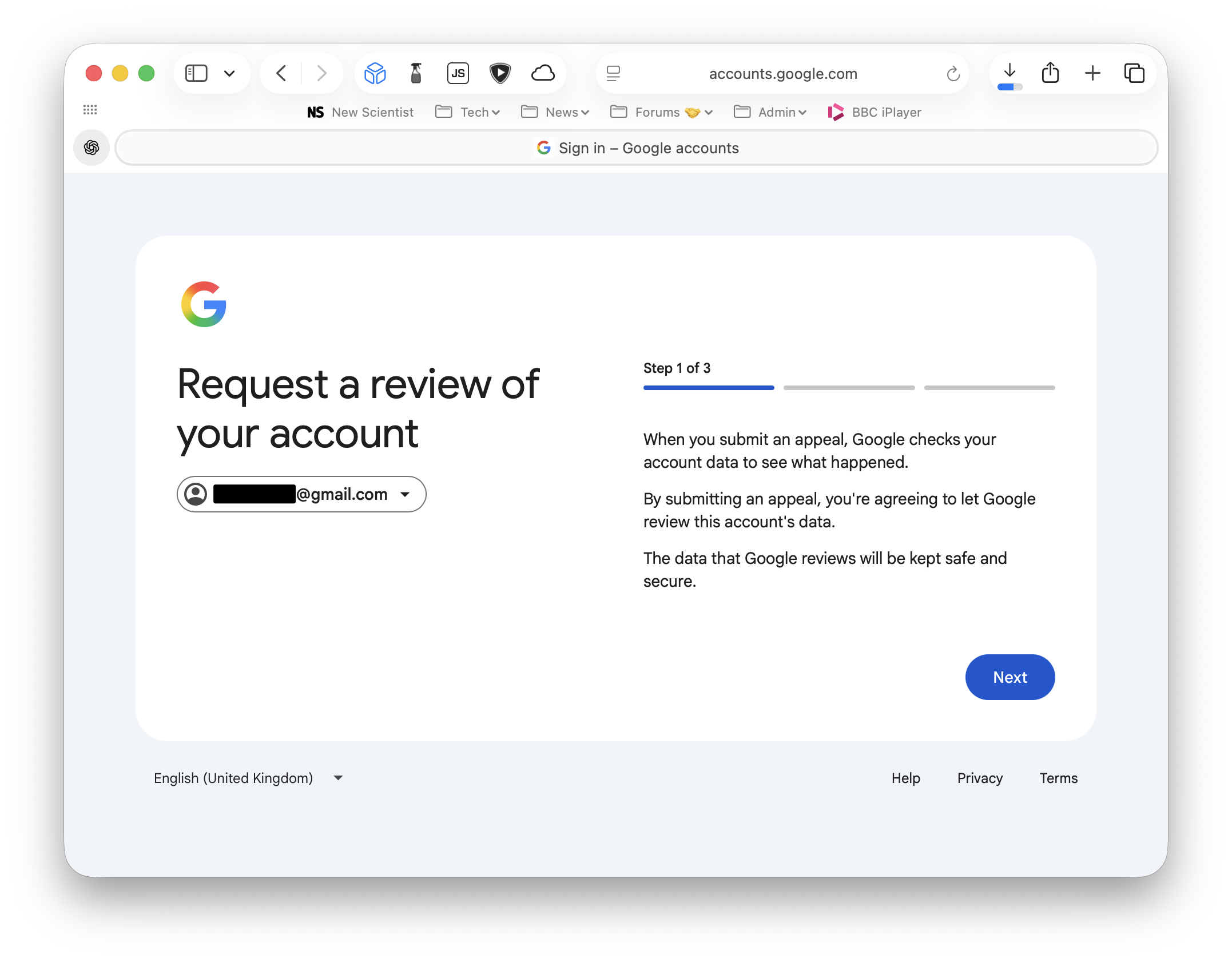
So I was surprised when I tried to log in a couple of weeks back and was told that the account had been suspended. The reasons listed ranged from downright trivial (Google’s policies – OK, whatever) to extremely serious – hacking and child abuse.
There was an option to submit an appeal, and so I did. I explained that I had no idea what the problem was and I just wanted to find an old email. The appeal was rejected within a few hours, but it did tell me that the reason for the appeal being rejected was “Our review found that your account was created or used with multiple other accounts to violate Google’s policies. It appears the account might have been created by a computer program or bot.”
I was almost certain Google were not paying human beings to do these reviews, and so at this point I’ve likely found myself in the position of having to try and prove I’m not an AI bot to an AI bot itself. This is ridiculous! The account is 18 years old, and at one point, during my days as an Android user, it would have had a credit card associated with it for buying apps from Google Play.
I decided to submit another appeal. This time, rather than a few lines, I wrote a more detailed 174-word appeal and again made sure not to use any AI assistance at all. I provided my phone number, my website, and told them they could do a Whois on my domain and see it’s been active for 24 years. I pointed out that the Google account in question was 18 years old. Why only now are they suggesting it was created by a bot? Within a few hours, this appeal was again denied.
Google explicitly allows multiple accounts. I have never (knowingly) violated any Google policies. The bottom line is Google can’t tell if you are human or not. A slight silver lining is that I can export my data using Google Takeout, but honestly, the fact that Google are so poor at this would make me think twice about relying on Google for anything serious.
So it turns out Google never was my friend, and probably isn’t yours either.
If you regularly commute, then you’ll know the feeling of arriving at Waterloo station, or maybe Paddington, having battled across London on foot, Lime Bike or maybe the Tube. The question arises: which train will get me home fastest? There are many apps that can show you train times, but in my experience they work terribly over poor data connections (phone signal in busy stations at rush hour is often saturated), are poorly built, and seem focused on trying to sell you a ticket or something rather than just telling you the information you need. They will often weight slow trains equally with fast ones. All I want to know is: when is the best train, and what platform is it at so I can decide: do I need to leg it to the platform for a train that’s in 2 minutes, or will I be hanging around for another 20 minutes for the next one?
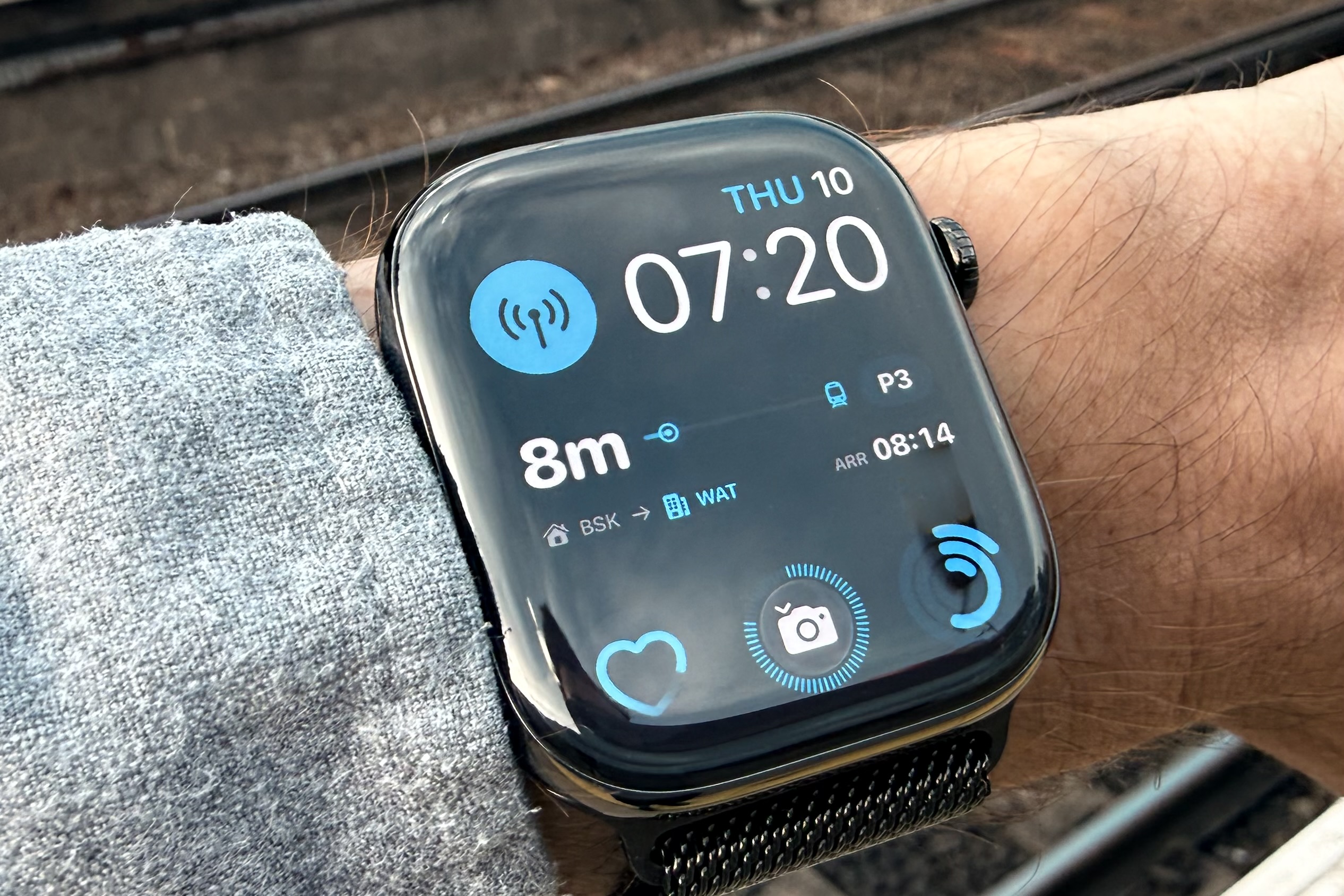
For the cost of less than a coffee, NxTrain, an app for iPhone and Apple Watch, allows you to configure your commute and then have the next train, time, and platform displayed on your Apple Watch or iPhone’s Lock or Home Screen as a widget. All you have to do is install the app, set up your home and work stations, and the times you typically leave and return. It will then automatically switch to showing your outbound or return train times. It even lets you open the app to see a full schedule of trains.
Now, as I pull in on the Northern Line at Waterloo, where there is no signal (there is everywhere else on the Tube it seems), I glance down at my watch and can already see where and when my next fastest train home will be. If it’s less than 6 minutes, I can usually leg it up the stairs and make it. In the mornings, before I set off on my bike to the station, I will quickly check the schedule to see if my usual train is delayed. No point rushing if it is. The app even pings a notification if there are lots of delays on your line, in case you need to reevaluate whether train travel is worth it today.
nxTrain 1.7 is now available in the App Store (UK only). It’s an app I built to make commuting by train more pleasant. It will show you your next train, the platform, and time at a glance - on your phone’s lock screen, Home Screen, or Apple Watch face. Or you can just open the app. It knows what time you leave and return home, so it shows the right direction automatically.
In short: In 1.7 it looks much better now. The previous version was functional, this version not only looks like something you’d actually want to have on your watch face or Home Screen, it’s also much more useful as a result.
However, important things first. I have a new icon, and I’m probably most excited about this. Especially its dark mode rendering. Yes, the train’s headlights come on at night:
(Drag the slider to compare)
Apple Watch App
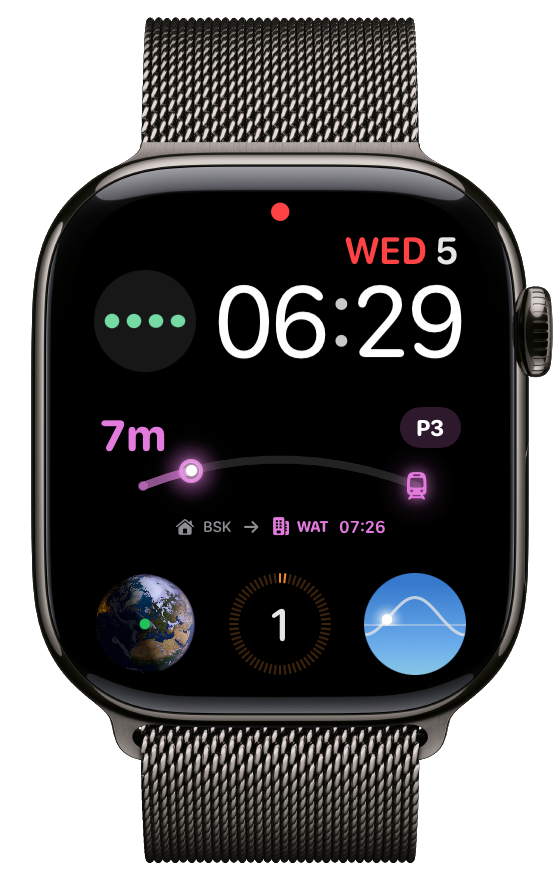
In the watch app, the complications now visualise how long there is to go until the next train arrives. When building this the question arose, but when did your start waiting? When should the countdown ‘start’ from? Initially I assume a 60 minute countdown so it fit naturally with the circular complication and visualising the number of minutes at a glance. That didn’t feel quite right though, so I changed it start from when the previous train left. If there are multiple trains scheduled then I take an average wait time between trains. So it’s a visualisation of how long you would have had to wait at most. I’m not 100% confident on this, so keen to hear feedback on how useful people find it. For me, I just wanted something that looked a bit nicer if I’m going to have it on my watch face all day. Complication designs for ‘off days’ (when no commute is scheduled) are also improved. If, for some reason iOS (or watchOS) hasn’t updated the widget for a while, it will show a tilde (~) next to the time, to indicate the data is not fresh. You can tap to open the app to get the latest data. This is more likely to occur if you use low power mode on your phone or watch.
iPhone App
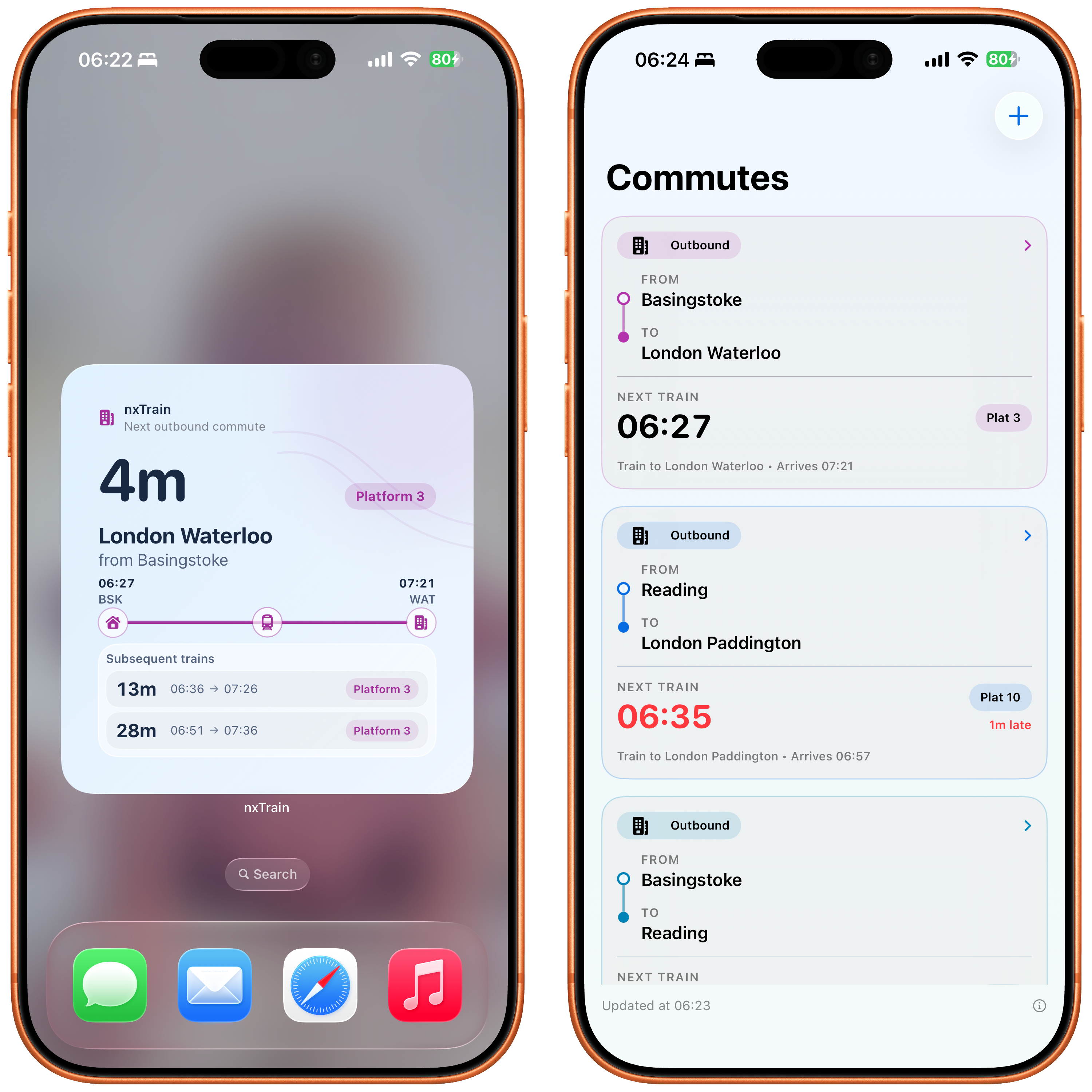
iPhone widgets get a major improve, again with some design applied to them. I should add there is a known bug where the wrong time can be shown if your next train to arrive at your destination isn’t the earliest departure time – I found this about 5 days after I’d submitted to the App Store. Fix incoming.
The app itself has been updated too. The main screen that lists your different commutes now makes it clearer they are different commutes using colours (these colours are also used in widgets and watch complications) and showing the from and to destinations rather than just the destination. This was a result of feedback that the old screen could be confused for a list of journeys within the same commute, especially at the end of a long day when you’re tired just wanted to get home! In the next update you’ll be able to give each configured commute a colour – for now they are set automatically. That update will be coming very soon.
Along with all this there are many general reliability updates.
Also the big news (I’ve buried the lede) - I’ve set the app to be FREE until the end of August. In return, please do me a favour and add a review on the App Store if you find it useful.
It’s only a day to go until WWDC 2026, and in a way it’s kind of strange when you stop to think about it. Each year we sit down to watch a marketing video, and over the next couple of hours Apple tells us the direction it has chosen for its platforms, its developers and a surprisingly large preportion of the human race.
Apple devices are now used by roughly 1 in 5 humans on the planet. That’s roughly 1.4 to 1.7 billion people, depending on how you account for people who own more than one Apple device. The company says there are more than 2.5 billion active Apple devices in use, against a world population of about 8.3 billion.[1][2] Around one in four active smartphones globally is an iPhone.[3]
Which makes me wonder whether the yearly feature rollout process should be a bit more, say, democratic? But that’s a thought to explore another day…
What I’m interested in is what Apple plans to do with AI. As I see it, there are three pillars to any AI strategy Apple might have.
The first is consumer-facing features: making my phone better at understanding me and doing useful things automatically. While there are features that attempt this at the moment, they are often unreliable or inconsistent. In 2026, nobody should have to copy and paste text from a WhatsApp message into their Calendar app, manually create an appointment, and invite everyone. AI is more than capable of automating this.
2023 was the year of using LLMs to improve spelling and grammar[4], and Apple was late to that. 2025 was the year of using them to actually perform tasks, and Apple is again late to this. I use the Reminders app to collaborate with my wife on a shared shopping list throughout the week. One of us then logs into a supermarket website and adds everything from the reminders list to the grocery basket, most of which we bought the week before (we tend to buy a lot of the same things every week but not always). As I go down the list, I’m mainly checking that prices haven’t become unreasonably high and looking out for the occasional special offer. What if Siri could notice that I’m doing this and offer to take control of my browser and do it for me? Again, the technology is capable of this, as anyone who has used the Claude browser plugin will tell you. This could be genuinely useful: a reminders app that actually executes your tasks rather than just bothering you about them! For a limited subset of life admin: things like booking car services, weekly grocery shopping, and holiday planning, I can see this being possible.
The second category is developer facing APIs. Here I think the ask is relativly simple. Allow developers to access AI models both on-device and in the cloud, automatically taking on user preferences, context and memory. I coudl go on here, but what I’m really interested in is the 3rd pillar.
The third pillar is vibe coding. The name is somewhat dismissive, but it represents the biggest change in the software industry since the World Wide Web went mainstream in the mid-1990s. It is now possible to create useful utility apps without writing any code by hand. Google has leaned into this with the latest version of Android, and Apple needs to do the same to avoid falling behind.
It should be possible to prompt my phone to make an app that shows me a map of every run I’ve ever logged, with the routes marked using a colour gradient based on the temperature on the day of each run. Or any other unique, random idea I might have. Apple needs to embrace the original vision of the Mac as a bicycle for the mind, only now it’s a motorbike for the mind. A consumer-facing vibe coding app, in the vein of Swift Playgrounds, could enable anyone to create small apps without ever needing to look at the underlying code. Those apps could then be saved to a private gallery and made available across all of their devices. The future is bespoke software, created by a prompt – that anyone can build regardless of how technical they are. I don’t think these small ‘applets’ will replace enterprise SaaS solutions, but for simple needs they will surfice. I’d like to see Apple embracing this in appleOS 27.
Unbeknown to me I was actually building “agentic” AI in 2023. I wrote an app that used an LLM to control Selenium and interact with online chatbots in a web browser, testing whether they were working correctly. It would automatically stop when it determined that the chatbot being tested had satisfied the objective it had been given. ↩︎
Today I am announcing a new app for iPhone and Apple Watch users called nxTrain. It’s designed to fill a gap specifically for people who commute by train in the UK on a regular basis. It allows you to configure your regular commute and then quickly see the next train, either from an Apple Watch complication, an iPhone widget, or by opening the app. That’s all it does. It’s that simple.
The specific problem I wanted to solve is this: when I’m on the Underground arriving at Waterloo station, I often have only a couple of minutes to find out when the next fastest train to Basingstoke is. Most existing apps assume you want to plan a complex journey or buy tickets. nxTrain assumes you already know where you are going, and just need to know which platform to run to. It will always show the next train based on its arrival time, not the departure time. So you don’t have to worry about inadvertently taking the slow stopping train. Background updating means there is also a good chance the platform information will already be there on your lock screen or watch face and you won’t have to struggle to find out on the underground with limited signal or at the station where signal can be saturated.
The app also lets you configure the times of day you usually leave for work and return home. This means widgets and complications can automatically show the next train in the appropriate direction based on the time of day. For hybrid workers, you can also configure the days you commute - so it won’t update on days when you don’t need it to, saving both battery life and bandwidth.
The app only supports direct train journeys, but for commutes with multiple legs it’s possible to set up multiple journeys, and even have a different widget setup for each. This can actually end up being more efficient than dedicated journey planner apps, which tend to assume people need longer to move between platforms than is often the case, especially if you do it regularly.
nxTrain is available in the App Store for less then at the price of a coffee.
In the late 90s, the term “RAD” was everywhere in software development. This had nothing to do with being stoner movies or being totally radical however. RAD stood for “Rapid Application Development”. It described an approach centred on speed and accessibility, where tools such as Delphi from Borland and Visual Basic from Microsoft made it possible to build working applications quickly, often with far less overhead and knowledge. This stood in contrast to more traditional methods of Windows development, which typically involved working directly with the C/C++ APIs and Win32 libraries, a process that was considerably more complex and time-consuming.
Visual Basic even came packaged as a “Leaning Edition” aimed at hobbyists looking to learn to code. The name Visual Studio was called this because it was “visual” - you could design your software by using a mouse and keyboard and by laying out elements on the screen. On the web development side, software like Microsoft FrontPage and Macromedia Dreamweaver also had this goal.
This idea that the layperson could do anything they want with their computer, not just what some somewhere software company somewhere allow them to do seemed to get lost somewhere in the mid-2000s. Software development got more and more complex and harder to pickup from scratch.
But now thanks to LLMs we are entering this era again. Right now, LLMs are unfathomably good at writing code. Good code. At present, to get the most out of tools like Open AI’s Codex or Claude Code, you need to have some prior experience of software development. This requirement is only going to lessen. In the near future it’s likely anyone will be able to type in an idea for an iPhone app and have something of decent quality generated within a few hours, if not minutes. I’ve recently “written” a bespoke iPhone app that fills a niche in my life. It’s production quality. It supports all the little things you’d expect on iOS, including widgets and an Apple Watch companion app. I didn’t write a single line of code. Instead, I used my experience as a developer to direct Codex and architect an application that is of sufficient quality that I’ve decided to release it to the App Store, in case anyone else finds it useful (more on this soon).
In my role as a product manager, I make extensive use of Jira. Nobody likes Jira. It is typical enterprise software that does everything for everyone, yet pleases nobody! While it’s possible to bend it to any process, but impossible to do so easily and elegantly without a million “hacks” or spending hours learning how to use its confusing UI. So I asked Claude Code to write an app that connects to the Jira API and presents a user interface that actually makes sense for the way we plan work. It took about 90 minutes in total and turned out to be very helpful.
What this means for SaaS companies is unknown. The way I see it, these “vibe coded” apps have a lot in common with the Visual Basic or Microsoft Access apps that would have been spun up by “power users” in the late 90s. They are able to fill gaps in software that SaaS companies struggle to justify the time to address, yet unless they happen to have an ex-developer building them, they will likely have all the pitfalls of RAD in the 90s. No backups. No upgrade path. Minimal testing. Little thought given to edge cases, compliance or security.
Maybe LLMs will be able to cover all that too. It is quite possible. But unless the human in charge knows to check for these things, then who knows? In the meantime, I can see SaaS companies that are able to bring the best of both worlds thriving by filling those bespoke gaps rapidly using LLMs to speed up development, while also providing SLAs and quality guarantees.
This also changes what users will expect from a computer. An iPad that can’t run Claude Code and do anything I can imagine, in minutes, is now orders of magnitude less useful than a full laptop that can.
AI is making it easier than ever to build your own software – and this is fantastic for users – but doing it well still takes care and attention.
The Apple Watch has been out for over a decade now, and yet its health and fitness insights have only improved marginally. GPS brought maps of your running routes, while more accurate accelerometers and gyroscopes enabled more in-depth running analysis. Better heart rate sensors allow for ongoing heart monitoring, and the addition of a thermometer helps with sleep and menstrual cycle tracking. There have been other improvements, admittedly, but the Health app itself has mostly just accumulated more charts.
Bevel aims to augment Apple’s base offering with its own app that analyses and interprets data from an Apple Watch, or any fitness tracker that writes to Apple Health, and provides actual recommendations, commentary, and more actionable insights. At least, that is the pitch.
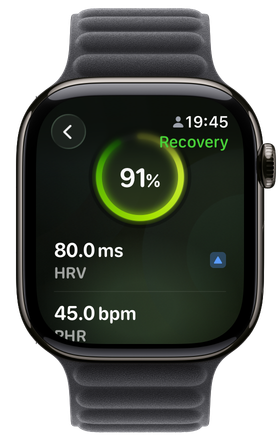
The key tenets of the app are the scores it provides for “Strain”, “Recovery”, “Sleep”, and “Stress”. The app is often compared to the Whoop fitness tracker, as both provide similar functionality[1]. Strain is a measure of how much you have put your body through on any given day. Unlike Apple’s Activity metric, it does not just look at movement and heart rate. It also factors in the toll your overall stress level takes on your body, as well as your ability to cope with that stress based on how well you recovered from the previous day, hence the Recovery and Sleep scores. Sleep takes into account how much time you spend in each sleep stage, not just total time asleep, along with wake-ups and bedtime consistency. Recovery looks at how quickly your nervous system calms down after stress and exercise. Stress uses resting heart rate and heart rate variability to estimate how stressed you are.
Overall, I have found the scores to be pretty helpful. It is important to take them in context. Sleep tracking using a device on your wrist is far from perfect, so if I wake up feeling great but Bevel says I had a bad night, I am not going to lose any sleep over it. Where it does help is in showing the impact of lifestyle choices on things like sleep and stress. Having a single pint of 4% IPA at lunchtime led to my HRV spiking for the next 24 hours and reduced the amount of deep sleep I got that night. Training too hard by pushing myself on runs too close together also spikes my stress levels. I more or less knew this already, but seeing the data as evidence, and seeing when positive changes make a difference, is genuinely useful. The stress metric is also much simpler than trying to work what your HRV means. As someone who has a tendency to over train and over work while not paying attention to my what my body is telling me, having a large stress score a tap away is good way to know when to skip that run or log off early.
And of course, it would not be 2026 if the app did not include a conversational interface courtesy of an LLM. The chat feature is actually very good. As someone who has worked in AI for the past decade, I cannot imagine that even three years ago we would have had a chatbot capable of making such accurate and useful insights about my own health. I can ask whether I should attempt a 10-mile run tomorrow or hold off for another day, and it will look at my scores, workout history, and other data to make a data-driven recommendation. It is not perfect. Like many LLM-based systems, it keeps a memory of things you say that it considers significant. This data is then fed into subsequent prompts, allowing an otherwise stateless model to learn about you over time. This can lead to amusing results when it overplays the importance or timing of something it has stored, such as when it assumed a beer I had at lunchtime on a Saturday was consumed at 6am on Sunday morning before a 10-mile run. Still, while many tech companies and LinkedIn influencers talk up so-called “agentic” software, Bevel is actually doing it, and it is providing real value. The LLM is cloud-based, probably OpenAI, Google Gemini, or Claude Sonnet, and Bevel state that they do not bulk-share your health data. Instead, they appear to send limited snippets as part of the prompt.
Bevel also supports logging food and drink, allowing you to correlate this with your scores and see how they are affected. For example, log a cup of tea at 5pm and you will probably see your sleep score drop noticeably. I have not really used this feature properly. For me, life is too short to estimate food intake precisely enough to be genuinely useful, although I can see how this would be worthwhile for some people.
Finally, there is the cost. It is £50 a year for the features mentioned above. Compared to the competition, namely Whoop or possibly the Oura Ring, that is very good value, assuming you already own an Apple Watch. The fact that you also get a capable smartwatch that does many other things, rather than a commodity fitness tracker or a very limited ring, makes this feel like a much better deal. It is also widely expected that Apple will introduce its own AI-based offering at some point in the near future.
Overall, I am very pleased with it and will be subscribing for a year.
As an aside, I have noticed Whoop becoming increasingly popular recently, which shows where Fitbit could have gone. It is essentially a Fitbit for the 2020s. I have even noticed people wearing both a Whoop and an Apple Watch. This really should not be necessary and is the primary reason I sought out a software-based solution. ↩︎
Anthropic, whose advanced chatbots are used by millions of people, discovered its Claude Opus 4 tool was averse to carrying out harmful tasks for its human masters, such as providing sexual content involving minors or information to enable large-scale violence or terrorism.
The San Francisco-based firm, recently valued at $170bn, has now given Claude Opus 4 (and the Claude Opus 4.1 update) – a large language model (LLM) that can understand, generate and manipulate human language – the power to “end or exit potentially distressing interactions”.
It said it was “highly uncertain about the potential moral status of Claude and other LLMs, now or in the future” but it was taking the issue seriously and is “working to identify and implement low-cost interventions to mitigate risks to model welfare, in case such welfare is possible”.
They are “highly uncertain about the potential moral status of Claude and other LLMs” –this sounds like great marketing from Anthropic. Fundamentally, LLMs are vast sequences of numerical operations on arrays of numbers, most prominently matrix multiplications. If these computations are suspected of having feelings, then by the same logic the calculations that render Super Mario racing around the track in Mario Kart would too. Maybe Nintendo’s next marketing campaign should be about how they have a study in place to make sure Mario and his chums’ welfare is looked after as they are forced to race endlessly around the same track day in day out.
Microsoft originally encouraged its employees to work from home amid the coronavirus outbreak in 2020. This new flexible working arrangement then became an official “hybrid workplace” policy several months after the pandemic began, allowing managers to approve permanent remote work. Now that the pandemic has settled into endemicity, Microsoft wants employees to return to the office. And if some quit in response, well, that’s probably exactly what Microsoft is expecting.
…
Microsoft is preparing to announce a mandatory return to office of three days a week. The policy will apply to those who live within 50 miles of Microsoft’s Redmond campus, and some teams at Microsoft may even return for four or five days.
My thoughts on working from home are that it’s a bit like your diet. The most appealing food isn’t necessarily the most nutritious. It might be tempting to avoid the office, and yes, the commute isn’t always the best use of time, but then doughnuts also taste better than kale.
We’ve come a long way from 2022, when a group of Apple employees attempted a Steve Jobs pastiche[1] by writing an open letter entitled “Thoughts on Office-Bound Work”, a reference to Jobs’s famous “Thoughts on Flash” open letter published in 2010. However, this article was not only poorly written and poorly argued, it also tried to frame some of the most privileged people in America (Silicon Valley tech workers) as somehow marginalised because Apple wanted them to turn up at the office a few days a week. The fact that you need to be wealthy enough to live in a house with a dedicated working space, that working from home isn’t even an option for many of the lowest-paid jobs, and that it therefore requires a certain amount of privilege, seemed to be completely lost on them.
I am fortunate enough to work from home 3 days of the week, but I also know that meeting colleagues in person is very important when it comes to building trust and camaraderie. It’s also vital for mentoring junior colleagues. I know several people early in their careers who have switched jobs to find companies where being in the office is the norm rather than the exception.
Hybrid is the way forward. A great employer understands that allowing workers to fit work around their life, whether that’s picking up children, attending appointments, or other commitments, leads to the best performance.
At the same time, it’s up to employees to take a mature view and acknowledge that it’s not just about them. Maybe other people they work with will need human contact. Maybe they do too, but don’t realise it. It’s no surprise that Microsoft reports higher employee wellbeing among those who come into the office.
So I’m hoping we can see a nuanced, balanced approach that respects workers’ rights, allows for flexibility, but also acknowledges that meeting people in person is valuable and not something to be avoided completely.
They even have “hot news” in the URL, a reference to a section on Apple’s web site in the early 2000s. ↩︎
 If you regularly commute, then you’ll know the feeling of arriving at Waterloo station, or maybe Paddington, having battled across London on foot, Lime Bike or maybe the Tube. The question arises: which train will get me home fastest? There are many apps that can show you train times, but in my experience they work terribly over poor data connections (phone signal in busy stations at rush hour is often saturated), are poorly built, and seem focused on trying to sell you a ticket or something rather than just telling you the information you need. They will often weight slow trains equally with fast ones. All I want to know is: when is the best train, and what platform is it at so I can decide: do I need to leg it to the platform for a train that’s in 2 minutes, or will I be hanging around for another 20 minutes for the next one?