Over the past few months, I’ve noticed a number of Amazon sellers using blatantly fake product shots. They’re not even trying to make them look realistic. A reverse image search reveals they’ve simply taken stock photos and pasted what is presumably a real photo of their product into them, with no regard for how the angle, lighting, or shadows appear.
This must surely be the best way to tell if a product is rubbish, rather than relying on the (probably also fake) reviews.
I haven’t quite dared to try any of them in person yet, but from what I’ve observed this year’s operating system releases are generally positive.
The new Liquid Glass UI theme is a welcome change, recalling the early days of Aqua when Apple crafted inventive, whimsical interfaces. Those were certainly fun times, but it’s important to remember it was a different era and Apple had far fewer customers. Early versions of Mac OS X also ran painfully slowly in part because of their fancy user interface. I’m hoping Liquid Glass won’t suffer the same performance issues, especially on older devices. I’m also aware of the legibility issues some beta testers are reporting, but I’m confident these will be ironed out before it rolls out in September.
The AI improvements are minor and there seems to be less focus on Apple Intelligence as a brand. I’m not sure why AI needed its own brand name really. It struck me that the likley reason for this seperation was because it was built by a different team within Apple, rather than it making sense from a user’s perepctive. Some of the new AI features do look interesting however: being able to call Apple’s models from within Shortcuts, and 3rd parties being able to utlise local LLMs (thus not requriing an internet connection) is huge. The problem is that the only devices to support this are relativly recent ones: 2023’s iPhone Pro line and 2025’s iPhone lineup. Even the base iPad which you can buy brand new from Apple today does not support local AI models. This means most apps will either have to make their AI powered features optional, ensure there is a server-side backup in place, or restrict their market to those on the latest devices. Since many apps are cross platform anyway, I think most developers will go with option 1 or 2.
The iPad has received the most substantial update, with full windowing support now available. I have no complaints about this, and can’t wait to try it out. I was particularly pleased to see that it will work even on the iPad mini and the 2020 iPad Air. While many people will now finally be able to harness the device’s powerful hardware, I still think the iPad’s biggest drawback is that it can only run software from the App Store. There are so many great apps like Visual Studio Code and Chrome that are not there for commercial or Apple’s policy reasons.
The fact that windowing is not available on the iPhone is also curious. When Apple split iOS and iPadOS into separate brands a few years ago, the reaction was mostly positive; finally, the iPad was getting the attention it deserved. But thinking about it now, I have to wonder if the reason was to reduce any expectation that features added to the iPad would also appear on the iPhone. At this point, with Apple Silicon, Apple is essentially selling its customers the same computer three or four times with only minor differences. They have different-sized screens, some have a keyboard attached and others rely on a touchscreen. Some have a better camera, and built in cellular. The core of the devices, even the operating system, near enough identical. if you own a recent iPhone, iPad, Mac or Apple Watch – you’ve bought the same computer multiple times. The iPhone’s Apple A18 chip has a similar level of performance to the Mac’s M1 chip, which is still a ridiulasly fast chip. There is no reason why an iPhone could not become a laptop or full desktop simply by plugging it into the a keyboard and monitor. In decades past, mobile phones lagged far behind desktop PCs in terms of performance, but today most people could use their phone as a desktop PC or laptop: the chip is powerful enough and there is ample memory. What’s holding this back is not the “free market” or a lack of demand, but, I suspect, Apple’s preference to continue selling us multiple devices. In this respect, the distinction between device classes is more a marketing one than a technical one.
Overall, I think the ’26 releases should be exciting, even if I wish Apple would embrace change product category perspective a bit more. Would today’s Apple of 2025 have released the iPhone in 2007 when the iPod was still king? I’m not so sure.
New estimates regarding the recently-exploited Microsoft SharePoint vulnerabilities now evaluate that as many as 400 organizations may have been targeted.
The figure is a sharp increase from the original count of around 100, with Microsoft pointing the finger at Chinese threat actors for the hacks, namely Linen Typhoon, Violet Typhoon, and Storm-2603.
The victims are primarily US based, and amongst these are some high value targets, including the National Nuclear Security Administration - the US agency responsible for maintaining and designing nuclear weapons, Bloomberg reports.
Microsoft makes it clear this is an issue with on-prem instances of SharePoint, not the cloud based Office 365 solution.
One might question why an organisation would choose to run these services on premises in 2025. In my experience, banks and other security-focused institutions often believe their own teams can outperform Microsoft Azure, Google Cloud or AWS. Yet time and time again, we see on-prem is actually less secure than the cloud. Unless your service is complelty air-locked from the Internet, I see very few reasons to be relying on on-premisis software, especially Microsoft products, in 2025.
Hopefully, running on-premises commercial services like this in the name of security will soon be consigned to the trash can of computing history, along with other security theatre measures often imposed by IT administrators, such as enforced password expiration.
Adverts for Virtual Private Networks (VPNs) are now a regular feature on many podcasts. A common theme I’ve noticed is the attempt to justify using a VPN by claiming that public WiFi networks are inherently unsafe without one. Take this recent example:
When you connect to an unencrypted network in cafes, hotels, airports, your online data is not secure. Someone on the same network can gain access to your information, passwords, bank logins, credit card information, and other things that you don’t want in someone else’s hands.
This is absolute nonsense. Yes, it’s true that if the WiFi network doesn’t require a password to connect to, then your data will be sent in the clear and could theoretically be accessed by anyone, as made famous by the app Firesheep. This was in 2010 however. In fifteen years since then, and the twelve years since the Snowden leaks, the vast, vast majority of websites have adopted their own encryption to protect data in transit. Even before then, any reputable site handling sensitive information (such as online banking or payment processing) was already using TLS (Transport Layer Security). In 2025 (and really for the past decade), you do not need a VPN when on public WiFi.
Regardless of whether the WiFi network is encrypted, there are inherent risks in connecting to a network you can’t necessarily trust. Most devices have built in firewalls to mitigate this. As long as that’s switched on, you’re probably going to be OK.
So why would anyone use a VPN? As far as I can tell there are only three reasons why anyone would use a VPN:
To access protected network resources — it’s common for companies to require employees to be on a VPN before they can access sensitive resources as an additional security layer.
To fake your location — Netflix and many other streaming platforms often offer better content in different regions, or perhaps you simply want to access BBC iPlayer while you’re abroad.
To conceal your IP address — for instance, if you’re involved in illegal activity or working as a journalist needing anonymity.
I would not hesitate to use online banking over Starbucks WiFi. In fact, I’d be more worried about someone peering over my shoulder than any threat from the network itself.
So don’t be taken in by the scaremongering ads. The chances are, you don’t need a VPN.
But if you’ve got another reason for using one, let me know in the comments below.
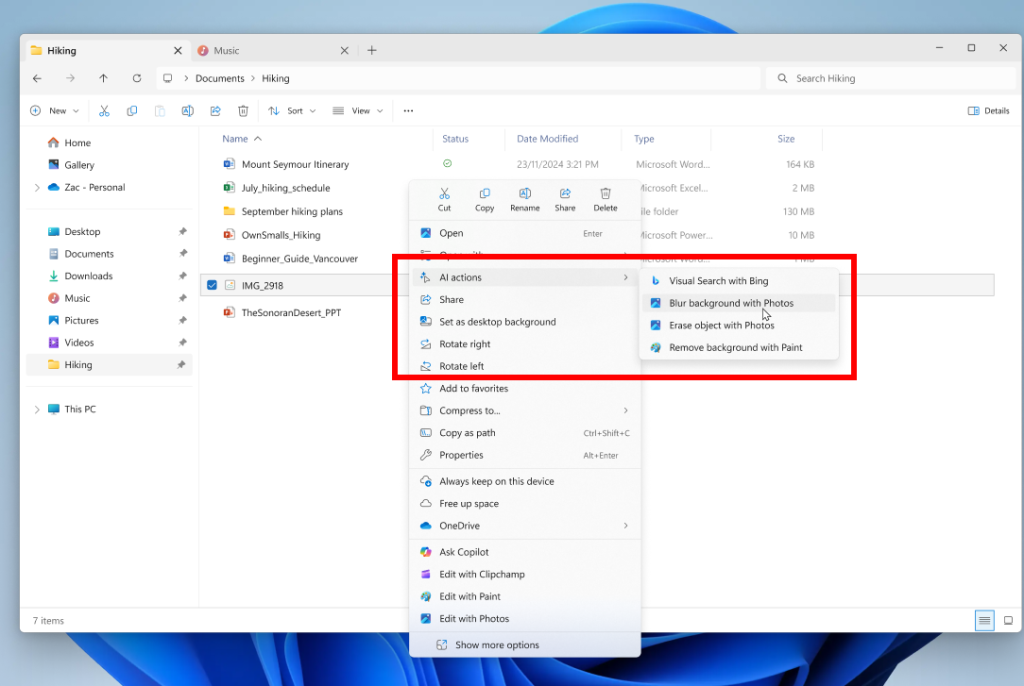
Microsoft, in its ongoing quest to make Windows 11 feel increasingly clumsy and tone-deaf, has now decided to add a new “AI Tools” menu to Windows Explorer. One can almost picture the product management meeting, where some directive from on high decreed: “We must be seen to be using AI in everything, everywhere and all at once.”
While they may have a tendency to over-explain the obvious (as shown by this 1,000+ word blog post just to say they’re replacing passwords with PassKeys – something that could be summarised in a single paragraph), the decision to lump a collection of seemingly unrelated features into one menu simply because they involve “AI” suggests either a complete absence of user centric thinking or a rather desperate attempt to appear as an AI leader.
The screenshot shows four menu items. The first, “Visual Search with Bing” (one can only imagine how many bureaucrats had to approve that name), allows you to search the web using something similar to Google’s reverse image search or Apple’s Visual Lookup. The other three are image editing tools: one for adding a background blur (which uses AI to detect the main subject in an image and blur everything else), one for erasing objects (where AI estimates what would be behind the removed element and fills it in), and one for removing the background entirely (essentially the same as the blur tool, but deleting the background pixels instead of blurring them). There’s also another totally separate “Ask Copilot” menu, which presumably also uses AI, but I’m guessing this was built by another team which would explain why it’s in a totally different place in the context menu.
All of these features are genuinely useful, and it’s great to see them included in Windows (presumably using on-device processing rather than relying on the cloud). However, grouping them under an “AI Tools” menu doesn’t make much sense. “AI” in this context means machine learning-based processing and is becoming as commonplace as traditional processing tasks. Designing a user interface around the underlying technology rather than the user experience is a fundamental mistake. That’s not to say a UI shouldn’t ever mention “AI” – it is important to let users know when AI (especially generative AI) is going to be used or was used, as it provides a useful prompt to scrutinise the output more carefully and helps set expectations. But Microsoft’s overuse of it just makes them seem a little desperate to be seen as jumping on the AI bandwagon and risks users switching off every time they see yet another “AI” feature.
This surge was partly driven by a widespread misconception that embedding-based similarity search was the only viable method for retrieving context for LLMs. The resulting “vector database gold rush” saw massive investment and attention directed toward vector search infrastructure, even though traditional information retrieval techniques remained equally valuable for many RAG applications. … However, the landscape has evolved rapidly. What started as pure vector search engines now expand their capabilities to match traditional search functionality. Vector database providers have recognized that real-world applications often require more than just similarity search.
I’ve never quite understood the hype around using similarity search to retrieve content for a RAG system. Yes, cosine similarity can be useful in certain situations, but in many cases, there are better ways to find the right content. This is especially true when the user’s question has little semantic resemblance to the answer. Not to mention when you have potentially multiple versions of the same documents that may or may not be relevant depending on the context of the question. Now every major database supports vector search, is there even a need for a dedicated product? I’d recommend giving the latest episode of the Latent Space podcast a listen where they explore these issues, and alternatives, in more depth.
A major journalism body has urged Apple to scrap its new generative AI feature after it created a misleading headline about a high-profile killing in the United States.
The BBC made a complaint to the US tech giant after Apple Intelligence, which uses artificial intelligence (AI) to summarise and group together notifications, falsely created a headline about murder suspect Luigi Mangione.
The AI-powered summary falsely made it appear that BBC News had published an article claiming Mangione, the man accused of the murder of healthcare insurance CEO Brian Thompson in New York, had shot himself. He has not.
I’ve worked on implementing AI into software products for the past seven years, and the first rule is always to start with a narrow domain, carefully assess how effective it is, and, if your approach is working, gradually expand your domain coverage. When it comes to notification summaries, I can’t help but wonder why Apple didn’t adopt this approach. Instead, they’ve delivered something that feels more like a hasty student project than the polished innovation we’ve come to expect.
Specifically, I would have started by limiting the product to summarising notifications where summaries are genuinely most useful. Of course, not being a product manager at Apple, I haven’t done the research, but let’s assume messaging apps would top the list. A “TL;DR” summary for lengthy WhatsApp group chats, for instance, could be genuinely valuable. On the other hand, attempting to summarise product promotions or delivery notifications from Amazon, breaking news, or even the alerts I get when my wife logs a feed on our baby-tracking app feels far less useful. Most of the complaints I’ve seen online seem to involve apps like BBC News, Amazon, or other non-communication apps. Apple would be better off avoiding attempts to summarise these types of notifications and instead focusing on apps where summarisation truly adds value: messaging apps such as WhatsApp or Slack.
That’s not to say the current implementation is flawless when it comes to messaging apps either. In an example shared by WSJ technology journalist Joanna Stern, the iPhone mistakenly assumed her wife was referring to a non-existent husband. The issue likely arose because Stern has her wife saved as “Wife” in her address book. The smaller language model onboard the iPhone, relying on statistical assumptions, concluded that someone called “Wife” must be referring to a husband when mentioning another unnamed person. It’s exactly the sort of edge case1 that could have been caught more easily during testing if the first version had maintained a laser-like focus on summarising messaging app content.
By starting small and focusing on where summarisation adds the most value, Apple could have delivered a more refined and impactful feature, avoiding many of the issues we’ve seen reported .
Having become a semi-regular commuter to London, I’ve found that the various well-known apps for checking train times are all terrible. There isn’t an app where you can simply say: here is my regular commute; I just need to know the next train, which platform it’s on, and whether it’s delayed.
TheTrainLine is arguably focused on planning journeys, and the National Rail app is just plain awful, especially in areas with poor signal.
Enter trntxt.uk. It’s a simple website that lets you enter your starting station and destination, generating a unique URL you can bookmark or add to your phone’s home screen. You can instantly see the next train, its duration (helpful for avoiding the slow ones), its ETA, and the platform. It’s perfect for commuters — and it’s free.
A swing-and-a-miss from MKBHD. Criticism of the app is on two separate levels, but they’re being conflated. Level 1: the app is not good. Level 2: a paid wallpaper app? — LOL, wallpapers are free on Reddit. That second form of criticism — that there shouldn’t even exist a paid wallpaper app — is annoying and depressing, and speaks to how many people do not view original art as being worth paying for. But it also speaks to the breadth of Brownlee’s audience, which I think is more tech-focused than design-focused.
What’s even more annoying and depressing is the inability to separate the appreciation of art from the act of commerce. Perhaps people didn’t expect someone reportedly already making millions to charge so much for so little. The app description mentions “teaming up with top-tier digital artists,” so it’s not as if it’s even showcasing lesser-known artists who might benefit from the app’s exposure and thus warrant some philanthropy. Gruber is wrong here. You can appreciate good design while also thinking £12/month is a rip-off.
On Monday, software developer Michael Sayman launched a new AI-populated social network app called SocialAI that feels like it’s bringing that conspiracy theory to life, allowing users to interact solely with AI chatbots instead of other humans. It’s available on the iPhone app store, but so far, it’s picking up pointed criticism.
A social networking app where you are the centre of the universe, surrounded by bots constantly providing you with positive reinforcement and worshipping your every word. Elon Musk must be kicking himself – he could have saved $44 billion.
 Over the past few months, I’ve noticed a number of Amazon sellers using blatantly fake product shots. They’re not even trying to make them look realistic. A reverse image search reveals they’ve simply taken stock photos and pasted what is presumably a real photo of their product into them, with no regard for how the angle, lighting, or shadows appear.